onOffice Prozessmanager
Mann und Frau nutzen onOffice Prozessmanager

Process Management Software for Real Estate Agents

Our process management tool puts standardized workflows for agencies of all sizes on autopilot.

Try Process Manager Now

Prozessmanagement Software von onOffice nutzen im Team

Effortless Workflows With Our Process Management Software

Always the same routine: preparing notary appointments, requesting land register extracts, or sending birthday greetings… Relieve yourself and your team by simply automating standard tasks. But how? The answer is simple: There are plenty of process management tools available, but only onOffice is integrated with your real estate software.

Automate your routine tasks with the Process Manager in onOffice enterprise and switch to autopilot!

The Benefits: Why Realtors Choose Our Process Manager

The digital assistant for automated workflows with onOffice enterprise.

  • More Efficiency, Less Effort

    Experience significant relief with high service quality.

  • Stay Memorable

    Automatically send small tokens of attention.

  • Flexible Configuration

    Design processes according to your preferences.

  • For Companies of All Sizes

    From one-man shows to international big players.

Real-World Success: Our Process Manager in Practice

See how modern real estate professionals use our automation tools to stay ahead of the competition.

  • Man uses the onOffice Process Manager

    Effortless Operations with Smart Automation

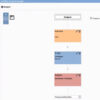
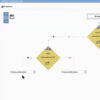
    Our Process Manager allows you to design custom workflow blueprints once and let the software handle the heavy lifting. Using an intuitive flowchart designer, you can map out every step—from initial lead qualification to closing—including automated emails, task assignments, and decision-based triggers.

    You decide how your workflows begin. Start processes manually with a single click or set “Auto-Start” triggers based on specific criteria—such as a new inquiry, a signed contract, or GDPR consent. Once triggered, your processes run reliably in the background while you focus on high-value tasks.


  • Use Process Manager from onOffice in team meetings

    Elevate Your Real Estate Marketing

    Use the Process Manager to perfect your After-Sales and Referral Marketing. Automatically check in with buyers six months after their move-in, or send personalized holiday and birthday greetings without lifting a finger. These small touches build lifelong loyalty—the Process Manager ensures you never miss a milestone.

Process Management Software by onOffice enterprise

Introducing the Process Manager.

Video onOffice process management software for real estate agents

Step-by-Step: Setting Up Your First Workflow Template

Digitalizing your workflows is straightforward. Here’s how to build your foundation:

  • 1. Open Process Manager

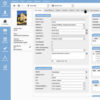
    Access the “Processes” icon in your sidebar. Here you can view active workflows, drafts, and templates.

  • 2. Create a New Template

    Click the arrow next to the “Plus” icon and select “New Process Template” to launch the visual Process Designer.

  • 3. Configure Settings

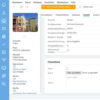
    Use the wrench icon to name your process, add a description, and assign responsible team members.

  • 4. Design the Flow

    Use the “Choose Process Step” dropdown to add actions (Emails, Tasks, Decisions). Use the pen icon to customize each step.

  • 5. Go Live

    Check the “Activate Process” box. Your workflow is now ready to be triggered manually or automatically by the system.

Try Our Automation Tools

Experience a stress-free workday.
Discover how much easier your life can be when the software does the busy work. Try every feature of onOffice enterprise for 7 days – free and without obligation.

Try the Process Manager

Man in front of laptop

Smart Workflows for Stress-Free Workday

Our process management software is incredibly flexible, allowing every real estate company to streamline their routines.

Almost all work steps can be automated, which is a huge plus for us. The intensive use of the process manager ensures comprehensive automation of the entire workflow. Routine work is taken care of by the system. This leaves more time for customer relationships. An absolute win-win situation!

Alfred Laufenberg, Laufenberg-Immobilien GmbH

Master the Process Manager: Video Tutorials

Ready to take your first steps? Our training videos walk you through the setup and show you how to get the most out of your automation tools.

Video onOffice Prozessmanager
Commissioning a designer
Video onOffice Prozessmanager
Marketing approval
Video onOffice Prozessmanager
Notification for owners
Video onOffice Prozessmanager
List properties in advance

In which versions is it included?

The Process Manager is a core feature in our premium editions or can be added as an upgrade to other plans:

  • onOffice enterprise all-in
  • onOffice enterprise expert
Der onOffice Prozessmanager

The Shortcut: Our Pre-Configured Process Packages

Want to automate your routines without starting from scratch? No problem! We have practical process packages for typical areas of responsibility: acquisition, data maintenance, lead management, or HR processes are all handled by the system. Our process packages are customized to fit your onOffice enterprise version.

Learn More

Testimonial Real Success Stories

DKB Grund Logo

onOffice offers various ways to interact with customers. The optimal process management in onOffice software brings various sales and operating units of DKB Grund into harmony. The onOffice enterprise application is customer and employee-friendly.

Anett Haberland, Managing Director DKB Grund GmbH

Maison Immobilien Logo

Processes control quality management at maison Immobilien. The organizational workflow is determined by well-defined processes, ensuring consistent quality of work. In property preparation, the process ensures that all data, land register extracts, or building load register are available, and all building law questions are clarified before publication. Thanks to the processes, property preparation always maintains the same level of quality.

Jan Mettenbrink, Managing Director maison Immobilien

Pflugfelder Logo

The collaboration with onOffice has provided significant added value since 2019: Through the enquiry and process manager, the company works efficiently and can quickly respond to enquiries. The clear process mapping in the system enables focused sales control and relieves the team of internal administration tasks.

Sascha Braun, Managing Director Pflugfelder Immobilien Treuhand GmbH

Berliner Volksbank Logo

The Process Manager can automate workflows such as customer correspondence or task creation and monitoring. It is also used for workflows that always follow the same principle, such as congratulations for special occasions, property inspections, or post-appointment follow-up.

Daniela Seide-Mainka, Managing Director Berliner Volksbank Immobilien GmbH

FAQ

Our Process manager is a specialized automation engine within onOffice enterprise. It’s designed to eliminate manual repetitive work by standardizing your agency’s “best practices” into digital workflows. Once you define the steps, the system executes them automatically.

The possibilities are virtually limitless. Our Process Manager is designed to handle the heavy lifting of your daily routine, ensuring that no lead is dropped and no critical task is forgotten. By automating the “busy work,” you can focus on building relationships and closing deals.

  • Lead & Enquiry Management: Instantly qualify incoming leads, automate property brochure delivery, and set up smart follow-up sequences to stay top-of-mind.
  • Property Acquisition & Preparation: Streamline your “Onboarding-to-Market” pipeline. Manage document checklists, coordinate with energy consultants, and automate owner updates seamlessly.
  • After-Sales & Client Retention: Turn one-time buyers into lifelong advocates. Automate notary workflows, move-in check-ins, and personalized anniversary or holiday greetings.
  • Internal Operations & Compliance: Secure your agency with standardized routines for GDPR (Data Protection), AML (Anti-Money Laundering) checks, and onboarding new team members.

Automation begins with Process Templates. You can design these to trigger automatically or launch them manually when needed. To create a new blueprint, simply click the arrow icon next to the “Plus” symbol in the module. From there, you have full creative freedom to build your workflow. Once you’re happy with the configuration, hit “Activate” and your automation is live. For a detailed walkthrough, check our step-by-step guide above.

It depends on your plan. The Process Manager is fully included in the onOffice enterprise all-in and expert editions. For all other versions, it can be easily added as an optional upgrade to supercharge your workflow.

Yes! You can connect your favorite third-party apps using the “Webhook” step within your process. You have the flexibility to choose between “Marketplace-Linked” services or “Custom Configurations,” allowing you to build a truly bespoke digital ecosystem.

Absolutely. We provide a selection of Standard Templates to help you hit the ground running. You can use these as a foundation and customize them to fit your needs. If you’re short on time or want a high-end setup immediately, explore our Pro Process Packages – expertly crafted workflows ready for instant deployment.

Additional Features

These features work hand-in-hand with the Process Manager to maximize your productivity.

  • Enquiry Manager

    Respond to property inquiries around the clock.

  • Telephone Module

    Integrate onOffice enterprise with your phone system to simplify call operations.

  • Automatic Brochure Dispatch

    Automatically send suitable property brochures to interested parties.

Explore Our Software

Discover all the features that onOffice enterprise has to offer!

All Features

Lächelnde Frau vor Laptop entdeckt die vielfältigen Funktionen von onOffice enterprise.

Any Questions?